The Apple Watch has been out for over a decade now, and yet its health and fitness insights have only improved marginally. GPS brought maps of your running routes, while more accurate accelerometers and gyroscopes enabled more in-depth running analysis. Better heart rate sensors allow for ongoing heart monitoring, and the addition of a thermometer helps with sleep and menstrual cycle tracking. There have been other improvements, admittedly, but the Health app itself has mostly just accumulated more charts.
Bevel aims to augment Apple’s base offering with its own app that analyses and interprets data from an Apple Watch, or any fitness tracker that writes to Apple Health, and provides actual recommendations, commentary, and more actionable insights. At least, that is the pitch.
The key tenets of the app are the scores it provides for “Strain”, “Recovery”, “Sleep”, and “Stress”. The app is often compared to the Whoop fitness tracker, as both provide similar functionality[1]. Strain is a measure of how much you have put your body through on any given day. Unlike Apple’s Activity metric, it does not just look at movement and heart rate. It also factors in the toll your overall stress level takes on your body, as well as your ability to cope with that stress based on how well you recovered from the previous day, hence the Recovery and Sleep scores. Sleep takes into account how much time you spend in each sleep stage, not just total time asleep, along with wake-ups and bedtime consistency. Recovery looks at how quickly your nervous system calms down after stress and exercise. Stress uses resting heart rate and heart rate variability to estimate how stressed you are.
Overall, I have found the scores to be pretty helpful. It is important to take them in context. Sleep tracking using a device on your wrist is far from perfect, so if I wake up feeling great but Bevel says I had a bad night, I am not going to lose any sleep over it. Where it does help is in showing the impact of lifestyle choices on things like sleep and stress. Having a single pint of 4% IPA at lunchtime led to my HRV spiking for the next 24 hours and reduced the amount of deep sleep I got that night. Training too hard by pushing myself on runs too close together also spikes my stress levels. I more or less knew this already, but seeing the data as evidence, and seeing when positive changes make a difference, is genuinely useful. The stress metric is also much simpler than trying to work what your HRV means. As someone who has a tendency to over train and over work while not paying attention to my what my body is telling me, having a large stress score a tap away is good way to know when to skip that run or log off early.
And of course, it would not be 2026 if the app did not include a conversational interface courtesy of an LLM. The chat feature is actually very good. As someone who has worked in AI for the past decade, I cannot imagine that even three years ago we would have had a chatbot capable of making such accurate and useful insights about my own health. I can ask whether I should attempt a 10-mile run tomorrow or hold off for another day, and it will look at my scores, workout history, and other data to make a data-driven recommendation. It is not perfect. Like many LLM-based systems, it keeps a memory of things you say that it considers significant. This data is then fed into subsequent prompts, allowing an otherwise stateless model to learn about you over time. This can lead to amusing results when it overplays the importance or timing of something it has stored, such as when it assumed a beer I had at lunchtime on a Saturday was consumed at 6am on Sunday morning before a 10-mile run. Still, while many tech companies and LinkedIn influencers talk up so-called “agentic” software, Bevel is actually doing it, and it is providing real value. The LLM is cloud-based, probably OpenAI, Google Gemini, or Claude Sonnet, and Bevel state that they do not bulk-share your health data. Instead, they appear to send limited snippets as part of the prompt.
Bevel also supports logging food and drink, allowing you to correlate this with your scores and see how they are affected. For example, log a cup of tea at 5pm and you will probably see your sleep score drop noticeably. I have not really used this feature properly. For me, life is too short to estimate food intake precisely enough to be genuinely useful, although I can see how this would be worthwhile for some people.
Finally, there is the cost. It is £50 a year for the features mentioned above. Compared to the competition, namely Whoop or possibly the Oura Ring, that is very good value, assuming you already own an Apple Watch. The fact that you also get a capable smartwatch that does many other things, rather than a commodity fitness tracker or a very limited ring, makes this feel like a much better deal. It is also widely expected that Apple will introduce its own AI-based offering at some point in the near future.
Overall, I am very pleased with it and will be subscribing for a year.
As an aside, I have noticed Whoop becoming increasingly popular recently, which shows where Fitbit could have gone. It is essentially a Fitbit for the 2020s. I have even noticed people wearing both a Whoop and an Apple Watch. This really should not be necessary and is the primary reason I sought out a software-based solution. ↩︎
Having become a semi-regular commuter to London, I’ve found that the various well-known apps for checking train times are all terrible. There isn’t an app where you can simply say: here is my regular commute; I just need to know the next train, which platform it’s on, and whether it’s delayed.
TheTrainLine is arguably focused on planning journeys, and the National Rail app is just plain awful, especially in areas with poor signal.
Enter trntxt.uk. It’s a simple website that lets you enter your starting station and destination, generating a unique URL you can bookmark or add to your phone’s home screen. You can instantly see the next train, its duration (helpful for avoiding the slow ones), its ETA, and the platform. It’s perfect for commuters — and it’s free.
Anthropic, whose advanced chatbots are used by millions of people, discovered its Claude Opus 4 tool was averse to carrying out harmful tasks for its human masters, such as providing sexual content involving minors or information to enable large-scale violence or terrorism.
The San Francisco-based firm, recently valued at $170bn, has now given Claude Opus 4 (and the Claude Opus 4.1 update) – a large language model (LLM) that can understand, generate and manipulate human language – the power to “end or exit potentially distressing interactions”.
It said it was “highly uncertain about the potential moral status of Claude and other LLMs, now or in the future” but it was taking the issue seriously and is “working to identify and implement low-cost interventions to mitigate risks to model welfare, in case such welfare is possible”.
They are “highly uncertain about the potential moral status of Claude and other LLMs” –this sounds like great marketing from Anthropic. Fundamentally, LLMs are vast sequences of numerical operations on arrays of numbers, most prominently matrix multiplications. If these computations are suspected of having feelings, then by the same logic the calculations that render Super Mario racing around the track in Mario Kart would too. Maybe Nintendo’s next marketing campaign should be about how they have a study in place to make sure Mario and his chums’ welfare is looked after as they are forced to race endlessly around the same track day in day out.
Microsoft originally encouraged its employees to work from home amid the coronavirus outbreak in 2020. This new flexible working arrangement then became an official “hybrid workplace” policy several months after the pandemic began, allowing managers to approve permanent remote work. Now that the pandemic has settled into endemicity, Microsoft wants employees to return to the office. And if some quit in response, well, that’s probably exactly what Microsoft is expecting.
…
Microsoft is preparing to announce a mandatory return to office of three days a week. The policy will apply to those who live within 50 miles of Microsoft’s Redmond campus, and some teams at Microsoft may even return for four or five days.
My thoughts on working from home are that it’s a bit like your diet. The most appealing food isn’t necessarily the most nutritious. It might be tempting to avoid the office, and yes, the commute isn’t always the best use of time, but then doughnuts also taste better than kale.
We’ve come a long way from 2022, when a group of Apple employees attempted a Steve Jobs pastiche[1] by writing an open letter entitled “Thoughts on Office-Bound Work”, a reference to Jobs’s famous “Thoughts on Flash” open letter published in 2010. However, this article was not only poorly written and poorly argued, it also tried to frame some of the most privileged people in America (Silicon Valley tech workers) as somehow marginalised because Apple wanted them to turn up at the office a few days a week. The fact that you need to be wealthy enough to live in a house with a dedicated working space, that working from home isn’t even an option for many of the lowest-paid jobs, and that it therefore requires a certain amount of privilege, seemed to be completely lost on them.
I am fortunate enough to work from home 3 days of the week, but I also know that meeting colleagues in person is very important when it comes to building trust and camaraderie. It’s also vital for mentoring junior colleagues. I know several people early in their careers who have switched jobs to find companies where being in the office is the norm rather than the exception.
Hybrid is the way forward. A great employer understands that allowing workers to fit work around their life, whether that’s picking up children, attending appointments, or other commitments, leads to the best performance.
At the same time, it’s up to employees to take a mature view and acknowledge that it’s not just about them. Maybe other people they work with will need human contact. Maybe they do too, but don’t realise it. It’s no surprise that Microsoft reports higher employee wellbeing among those who come into the office.
So I’m hoping we can see a nuanced, balanced approach that respects workers’ rights, allows for flexibility, but also acknowledges that meeting people in person is valuable and not something to be avoided completely.
They even have “hot news” in the URL, a reference to a section on Apple’s web site in the early 2000s. ↩︎
No joke: the UK Government’s Environment Agency and Department for Environment, Food & Rural Affairs has suggested deleting old emails to reduce water consumption.
If we assume these emails are stored in the cloud, and not on someone’s laptop (as was more often the case 10–15 years ago), then there might be something in this — but it’s tenuous, to say the least.
Yes, water is used to remove heat from data centres, but storing data does not, in and of itself, generate heat. Heat comes from computation, a deep property of the physical universe, though our current technology is still far from the theoretical limits where this becomes unavoidable.
Presumably, the thinking is that less data means fewer spinning hard disks or SSDs will be needed, and there will be less data to back up. So less heat. But this overlooks the minuscule amount of space an email actually takes up.
Processing email content creates heat (for example, to update search indexes or power AI tools) — but there’s a chance that deleting emails will cause these processes to run again anyway.
So I’m very confused by this. I’m pretty sure that having slighly less coffee in your mug would have a much greater impact than deleting some old emails.
Over the past few months, I’ve noticed a number of Amazon sellers using blatantly fake product shots. They’re not even trying to make them look realistic. A reverse image search reveals they’ve simply taken stock photos and pasted what is presumably a real photo of their product into them, with no regard for how the angle, lighting, or shadows appear.
This must surely be the best way to tell if a product is rubbish, rather than relying on the (probably also fake) reviews.
I haven’t quite dared to try any of them in person yet, but from what I’ve observed this year’s operating system releases are generally positive.
The new Liquid Glass UI theme is a welcome change, recalling the early days of Aqua when Apple crafted inventive, whimsical interfaces. Those were certainly fun times, but it’s important to remember it was a different era and Apple had far fewer customers. Early versions of Mac OS X also ran painfully slowly in part because of their fancy user interface. I’m hoping Liquid Glass won’t suffer the same performance issues, especially on older devices. I’m also aware of the legibility issues some beta testers are reporting, but I’m confident these will be ironed out before it rolls out in September.
The AI improvements are minor and there seems to be less focus on Apple Intelligence as a brand. I’m not sure why AI needed its own brand name really. It struck me that the likley reason for this seperation was because it was built by a different team within Apple, rather than it making sense from a user’s perepctive. Some of the new AI features do look interesting however: being able to call Apple’s models from within Shortcuts, and 3rd parties being able to utlise local LLMs (thus not requriing an internet connection) is huge. The problem is that the only devices to support this are relativly recent ones: 2023’s iPhone Pro line and 2025’s iPhone lineup. Even the base iPad which you can buy brand new from Apple today does not support local AI models. This means most apps will either have to make their AI powered features optional, ensure there is a server-side backup in place, or restrict their market to those on the latest devices. Since many apps are cross platform anyway, I think most developers will go with option 1 or 2.
The iPad has received the most substantial update, with full windowing support now available. I have no complaints about this, and can’t wait to try it out. I was particularly pleased to see that it will work even on the iPad mini and the 2020 iPad Air. While many people will now finally be able to harness the device’s powerful hardware, I still think the iPad’s biggest drawback is that it can only run software from the App Store. There are so many great apps like Visual Studio Code and Chrome that are not there for commercial or Apple’s policy reasons.
The fact that windowing is not available on the iPhone is also curious. When Apple split iOS and iPadOS into separate brands a few years ago, the reaction was mostly positive; finally, the iPad was getting the attention it deserved. But thinking about it now, I have to wonder if the reason was to reduce any expectation that features added to the iPad would also appear on the iPhone. At this point, with Apple Silicon, Apple is essentially selling its customers the same computer three or four times with only minor differences. They have different-sized screens, some have a keyboard attached and others rely on a touchscreen. Some have a better camera, and built in cellular. The core of the devices, even the operating system, near enough identical. if you own a recent iPhone, iPad, Mac or Apple Watch – you’ve bought the same computer multiple times. The iPhone’s Apple A18 chip has a similar level of performance to the Mac’s M1 chip, which is still a ridiulasly fast chip. There is no reason why an iPhone could not become a laptop or full desktop simply by plugging it into the a keyboard and monitor. In decades past, mobile phones lagged far behind desktop PCs in terms of performance, but today most people could use their phone as a desktop PC or laptop: the chip is powerful enough and there is ample memory. What’s holding this back is not the “free market” or a lack of demand, but, I suspect, Apple’s preference to continue selling us multiple devices. In this respect, the distinction between device classes is more a marketing one than a technical one.
Overall, I think the ’26 releases should be exciting, even if I wish Apple would embrace change product category perspective a bit more. Would today’s Apple of 2025 have released the iPhone in 2007 when the iPod was still king? I’m not so sure.
New estimates regarding the recently-exploited Microsoft SharePoint vulnerabilities now evaluate that as many as 400 organizations may have been targeted.
The figure is a sharp increase from the original count of around 100, with Microsoft pointing the finger at Chinese threat actors for the hacks, namely Linen Typhoon, Violet Typhoon, and Storm-2603.
The victims are primarily US based, and amongst these are some high value targets, including the National Nuclear Security Administration - the US agency responsible for maintaining and designing nuclear weapons, Bloomberg reports.
Microsoft makes it clear this is an issue with on-prem instances of SharePoint, not the cloud based Office 365 solution.
One might question why an organisation would choose to run these services on premises in 2025. In my experience, banks and other security-focused institutions often believe their own teams can outperform Microsoft Azure, Google Cloud or AWS. Yet time and time again, we see on-prem is actually less secure than the cloud. Unless your service is complelty air-locked from the Internet, I see very few reasons to be relying on on-premisis software, especially Microsoft products, in 2025.
Hopefully, running on-premises commercial services like this in the name of security will soon be consigned to the trash can of computing history, along with other security theatre measures often imposed by IT administrators, such as enforced password expiration.
Adverts for Virtual Private Networks (VPNs) are now a regular feature on many podcasts. A common theme I’ve noticed is the attempt to justify using a VPN by claiming that public WiFi networks are inherently unsafe without one. Take this recent example:
When you connect to an unencrypted network in cafes, hotels, airports, your online data is not secure. Someone on the same network can gain access to your information, passwords, bank logins, credit card information, and other things that you don’t want in someone else’s hands.
This is absolute nonsense. Yes, it’s true that if the WiFi network doesn’t require a password to connect to, then your data will be sent in the clear and could theoretically be accessed by anyone, as made famous by the app Firesheep. This was in 2010 however. In fifteen years since then, and the twelve years since the Snowden leaks, the vast, vast majority of websites have adopted their own encryption to protect data in transit. Even before then, any reputable site handling sensitive information (such as online banking or payment processing) was already using TLS (Transport Layer Security). In 2025 (and really for the past decade), you do not need a VPN when on public WiFi.
Regardless of whether the WiFi network is encrypted, there are inherent risks in connecting to a network you can’t necessarily trust. Most devices have built in firewalls to mitigate this. As long as that’s switched on, you’re probably going to be OK.
So why would anyone use a VPN? As far as I can tell there are only three reasons why anyone would use a VPN:
To access protected network resources — it’s common for companies to require employees to be on a VPN before they can access sensitive resources as an additional security layer.
To fake your location — Netflix and many other streaming platforms often offer better content in different regions, or perhaps you simply want to access BBC iPlayer while you’re abroad.
To conceal your IP address — for instance, if you’re involved in illegal activity or working as a journalist needing anonymity.
I would not hesitate to use online banking over Starbucks WiFi. In fact, I’d be more worried about someone peering over my shoulder than any threat from the network itself.
So don’t be taken in by the scaremongering ads. The chances are, you don’t need a VPN.
But if you’ve got another reason for using one, let me know in the comments below.
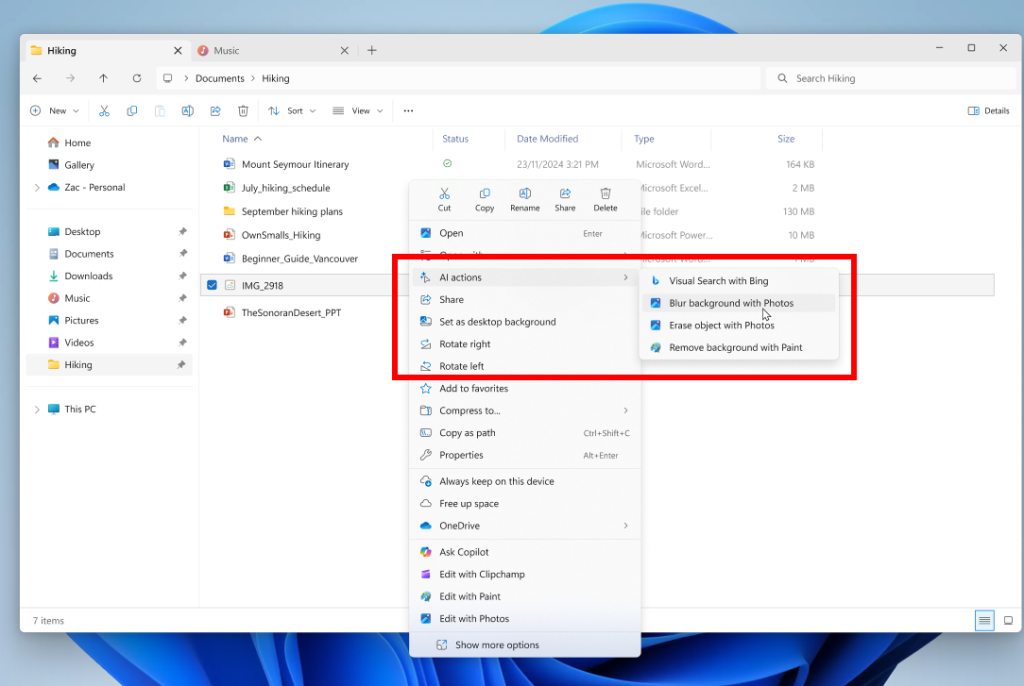
Microsoft, in its ongoing quest to make Windows 11 feel increasingly clumsy and tone-deaf, has now decided to add a new “AI Tools” menu to Windows Explorer. One can almost picture the product management meeting, where some directive from on high decreed: “We must be seen to be using AI in everything, everywhere and all at once.”
While they may have a tendency to over-explain the obvious (as shown by this 1,000+ word blog post just to say they’re replacing passwords with PassKeys – something that could be summarised in a single paragraph), the decision to lump a collection of seemingly unrelated features into one menu simply because they involve “AI” suggests either a complete absence of user centric thinking or a rather desperate attempt to appear as an AI leader.
The screenshot shows four menu items. The first, “Visual Search with Bing” (one can only imagine how many bureaucrats had to approve that name), allows you to search the web using something similar to Google’s reverse image search or Apple’s Visual Lookup. The other three are image editing tools: one for adding a background blur (which uses AI to detect the main subject in an image and blur everything else), one for erasing objects (where AI estimates what would be behind the removed element and fills it in), and one for removing the background entirely (essentially the same as the blur tool, but deleting the background pixels instead of blurring them). There’s also another totally separate “Ask Copilot” menu, which presumably also uses AI, but I’m guessing this was built by another team which would explain why it’s in a totally different place in the context menu.
All of these features are genuinely useful, and it’s great to see them included in Windows (presumably using on-device processing rather than relying on the cloud). However, grouping them under an “AI Tools” menu doesn’t make much sense. “AI” in this context means machine learning-based processing and is becoming as commonplace as traditional processing tasks. Designing a user interface around the underlying technology rather than the user experience is a fundamental mistake. That’s not to say a UI shouldn’t ever mention “AI” – it is important to let users know when AI (especially generative AI) is going to be used or was used, as it provides a useful prompt to scrutinise the output more carefully and helps set expectations. But Microsoft’s overuse of it just makes them seem a little desperate to be seen as jumping on the AI bandwagon and risks users switching off every time they see yet another “AI” feature.

 Over the past few months, I’ve noticed a number of Amazon sellers using blatantly fake product shots. They’re not even trying to make them look realistic. A reverse image search reveals they’ve simply taken