If you’re lucky enough to own a smartphone these days, as most people do, then you can most likely use it to replace your wallet. With Apple Pay and Google Pay, you can spend money without the need for cash for bank cards. Store Cards such as Tesco Clubcard can also be placed in your digital wallet. I even store my library card on my phone thanks to this app which lets you digitise any barcode based pass and place it in your Apple Wallet. I’m so used to this situation now, that I rarely go out with a wallet on my person. Once train ticket machines started taking contactless there really was no need. One less thing to lose, one less thing to remember.
However I ran into a slight hitch the other day when I ordered something online from for pickup in an Apple Store. I placed the order while walking through the shopping centre, knowing the item was in stock and would be ready for me to pick up within 30 minutes. I paid using Apple Pay on my phone, and an order ticket was placed into my digital wallet. About 10 minutes later a notification appeared on my phone saying it was ready for pickup. Excited, I took the escalator to the upper floor of the shopping mall and walked into the Apple Store, phone in hand, QR code ready on the screen. All went well until the Apple Store employee asked to see some identification. I had none. Why Would I? I use a digital wallet. In many respects, I am the prototypical Apple Customer, using minimal time from staff and making my purchase online using Apple Pay, from an iPhone. Yet they wouldn’t give me my new AirPods without seeing some form of identification.
While I understand that you can’t just handover expensive items without some kind of validation in place, I was surprised that Apple, of all companies, did not have a digital alternative in place. You could argue it’s not the role of Big Tech to be creating digital ID cards, and perhaps there are benefits to plastic-based identification. In the UK, thankfully there are no laws requiring citizens to carry identification (even when driving). That said, I’d love to see a solution that works in tandem with our existing systems and doesn’t exclude anyone who doesn’t own a smartphone, or wants to keep using plastic ID.
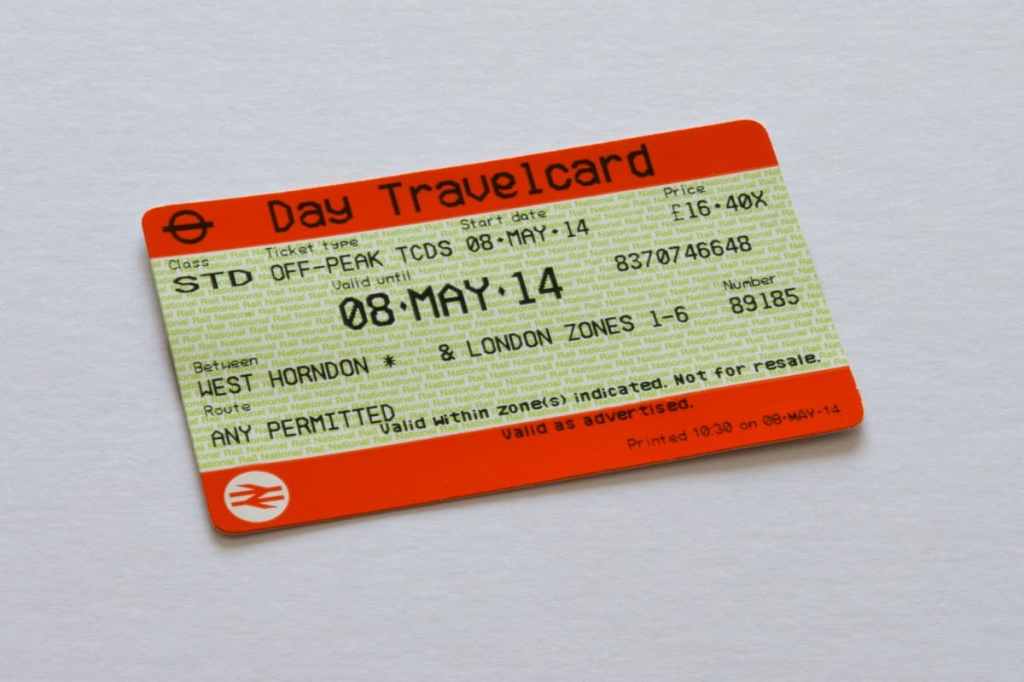
I thought I was just unlucky. It seemed that around 50% of the time I tried to exit a train station by inserting my ticket into the barrier, I’d receive a message asking me to seek assistance. Whether starting or finishing the journey in my local town of Reading or further afield, it seemed to happen very frequently, while everyone else seemed to strut through the barrier with no problem at all.
Today it finally clicked. I’ve been putting my train ticket in my pocket along with my AirPods. The charging case has the same satisfying click as you close it as a premium brand car does when shutting the door. It achieves this using magnets. My theory is that the magnets are interfering with the magnetic strip on the train ticket.
Paper train tickets probably aren’t long for this world anyway, but if you’re also experiencing the humiliation of having to speak to an actual human being on your commute, check your AirPods or other devices bearing magnets aren’t near your ticket.
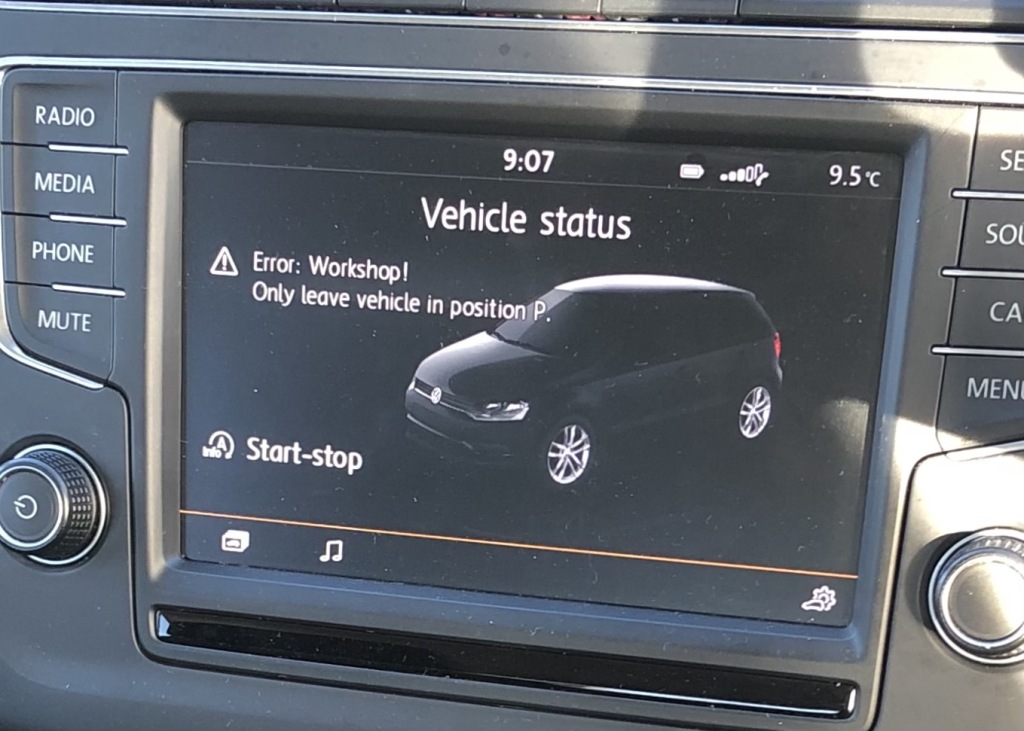
Within weeks of buying my car, a four-year old 2015 Volkswagen Polo 1.2 TSI SE 5d DSG, I discovered that I would occasionally be presented with an error message while driving stating “Error: Workshop! Only leave vehicle in position P.”
Although most of the time the audible tone and error message would disappear within five to ten seconds, it was disconcerting all the same, and a distraction while driving. For a long time I’ve been a “Do Not Disturb While Driving” convert, making use of iOS’s ability to silence notifications while I’m in the car. An alert that beeps and lights up your dashboard with a warning light is dangerous in its own right. If my car incorrectly thinks it’s in the workshop, or my gear shift should be somewhere else, that’s dangerous too.
Like any good millennial, I googled the error message and quickly found forum posts from other VW owners who’d seen the same message. The consensus was that it was caused by a faulty gear selector, and since it’s a known manufacturing fault, the forum posts informed me VW have a service bulletin out and their technicians should be able to identify and rectify the problem swiftly. Knowing I had one year’s warranty included with my purchase, I booked my car into the VW garage I’d bought the car from, who after a couple of hours told me they couldn’t find anything wrong. They said to see if it happens again and bring it back if it did. They left me their standard complimentary biscuit and I was sent on my way. Surprised by this, but trusting Volkswagen (and enjoying my sugar fix), I went away hoping the error, which had only occurred two or three times, would go away by itself.
Skip forward a few months and the error had reoccurred, and I’d also seen estimates that the cost of a new gear selector could run into the thousands. The error had kept happening every few weeks. At the same time I’d noticed my coolant kept dropping down below it’s expected level: I had a slow leak in my cooling system. When I booked this in to get fixed under warranty, I asked them to look at the “workshop!” error too. Again, they found nothing, but did replace my cooling system, over a thousand pounds worth of repairs. Surprising for a car that was only four years old, I was grateful for the warranty and another complimentary biscuit.
A month or two later, the message starting appearing more frequently. I booked it in again, keen to get it resolved before my one year warranty expired (even though as a manufacturing fault, VW should really cover it anyway). This time I told the them there were many forum posts stating it was probably the gear selector, and showed them a video I’d taken of the error (this was difficult to do without breaking the law, but thankfully on at least one occasion the error remained until I was parked off the road and able to take a photo).
After a having the car for a few hours, I was the told the error could be fixed by a software update to my infotainment system, and that as software isn’t covered under warranty I’d have to pay a £110 diagnostic fee. Even after explaining the forum posts saying it’s the gear selector, they insisted it was a software problem. Not happy about having to pay to fix a fault, I insisted I shouldn’t have to pay. The garage wouldn’t budge, stating that the warranty only covers mechanical and electrical faults. Even when I explained that software is powered by electricity and so is technically electrical, they refused to waive the fee. In the end I had to phone Volkswagen HQ, and after expressing my frustration and disappointment in Volkswagen in no uncertain terms, they were able to convince the garage to let me off the fee as a “goodwill gesture”.
While doubtful the software update would resolve the problem, I gave the technicals who work for Volkswagen the benefit of the doubt and hoped they had finally fixed this annoying and dangerous error message. I also got a another biscuit.
About a week after this, the alert showed again. In fact, it now started showing up more frequently. Sometimes multiple times in one journey, and sometimes not disappearing until I stopped the car and restarted the engine. I phoned Volkswagen again, this time in full “angry consumer” mode and, exacerbated by their inability to fix an issue that a simple web search returns a solution for.
For the fourth time, I dropped my car off. They had preordered a replacement gear selector this time, and so I was quietly confident it would be fixed. About six hours after handing over my car, I received a phone call informing that they had indeed found it was the gear selector and there was even a technical bulletin about this very fault. Thankfully there was no difference of opinion with warranty cover. 10 months into my 12 month warranty, I was reassured.
This was two days ago. I’ve not seen the message since. My fingers are crossed that this will indeed fix it, but after this experience, in all honesty, I’m not holding my breath. I think they’ve given up with the biscuits now. It’s disappointing but probably better for my health considering how many times I’ve had to go back.
If you experience this error, don’t give up. Mine got worse over time, so get it fixed- no matter how many times they push you away with free confectionary. It’s the gear selector!
It’s been four years since the Apple Watch was released, and I’ve worn a variant of the miniature device pretty much every day of my life for most of this time. You see them everywhere now, but in 2015, wearing a smart watch was a novel idea. I’ve always been interested in gadgets, owning my first “smartwatch”, as Casio Databank, when I was in secondary school. I remember the sum of £40 seeming like a huge amount when I bought the Casio watch, and to be fair, for a 12 year old in 1997, it was. I would marvel with amazement that a Casio Databank watch could store and entire 50 names and phone numbers, schedule alarms way off into the future, and knew how many days were in each month (no need to manually skip over the date for shorter months). The idea of walking around with all that information and potential on my wrist was both mysterious and exciting. How exactly did such a small device know to sound an alarm at precisely the time I’d chosen? Where exactly did all those names and number go when I entered them? I studied computer science and got a job as a software developer and so now it’s much less of a mystery to me how it all works, but my curiosity for these kind of smart devices never went away.
A UNIX Box on every wrist
Maybe it’s just because I’m now in my early thirties and relatively old, but it seems to me quite fantastical that the smart watches, especially the Apple Watch, are now mainstream. That it’s actually considered normal for someone to walk around with an always-on, UNIX-based computer strapped to their wrist - a computer far more powerful than any of the computers I grew up with back in the late nineties and early 2000s.
I find this especially interesting because these days, other consumer hardwire such as smartphones and laptops (or tablets) just aren’t that interesting. Phones don’t really do anything new anymore. Nicer screens, easier ways to log in, slightly better cameras - incremental updates that make the experience a little bit nicer. Smart watches on the other hand are vastly more compelling from a geek’s point of view.
First, there is room for a variety of styles: some of the designs released by LG and Fossil look genuinely beautiful, though Apple Watch is in a league of its own on that front.
Secondly, there is plenty of potential for new sensor input on the wrist. At the moment we have heart rate, accelerometer, and now ECG sensors with the latest Apple Watch, and there is so much more potential for a device that’s always on, and always being worn. Will the smart watch eventually displace the smartphone, just as the wrist watch displaced the pocket watch? I don’t think it will be as clear cut but I think they will eventually surpass mobile phone usage for many tasks. I certainly find that I need my phone less when wearing a smart watch - I just prefer to use it for certain tasks, mainly idling time reading the news or Facebook, or using the camera - the former is something I want to cut down on anyway.
Despite my initial skepticism, I’m now hooked on the Apple Watch. My home is strangely devoid of clocks. Apart from various computing devices, and my microwave, I have no clocks that I can easily glance at (partly due to finding ticking annoying!). Apart from making daylight saving days less of an event, it does mean I rely on a watch or smartphone to keep me on track during the morning. Outside of just telling the time, I’ve found the Apple Watch useful for using Siri to do things like set timers and reminders. This means I have no need for a dedicated smart assistant like Amazon Echo, a smart watch beats a stationary cylinder in many respects because it’s always with me. It’s now second nature to dictate reminders into my wrist. Those reminders can always be location based (“At work”, “when I leave my car” etc.), unlike an Echo or equivalent. Admittedly, I’m not going to listen to music on the watch’s speaker, and the inability to easily control Sonos via the watch is disappointing (there are 3rd party apps, but they’re pretty clunky). Apart from this, I do occasionally reply to text messages and emails I receive while at home, more often though I’ll initiate a text via the watch using Siri to dictate. Initially I thought I’d use the remote control ability for Apple TV more than I do, partly because there’s no volume control for the TV on the watch, nor the ability to send Siri input to the TV (for example to search for something), and so I end up usually needing the Apple TV remote anyway.
Wearing a fitness tracker like the Apple Watch has also helped motivate me to keep active. I was an occasional runner before I owned an Apple Watch, but since, I’ve really progressed in part due to the ability to easily measure my pace and exertion using the GPS and heart rate sensor. The built in activity app is pretty minimal, and so I find exporting to Strava useful to get some more useful insights into my progress. The ability to go for a run with just a watch and some headphones, and still have access to music, podcasts and statistics while I run is truly amazing.
The downside of wearing a computer all the time is that it can be difficult to switch off. Whether it’s BBC News or Strava, companies and apps are desperate for our attention, and the watch can make it easier for them to grab it from us. I’ll address this in a future post, but I feel the Apple Watch’s fitness goals and achievements are focused on gaining “streaks” and never missing a day. I’d love to see Apple admit that once in a while, disconnecting is also good for your health and reward users for doing so.
What would the world be like without standards? We take for granted that all of our electrical appliances fit into the same plug sockets, not giving it a second thought. We assume that that tires purchased from any manufacturer will fit our cars, given the correct wheel size and width. Who would even doubt that a lightbulb will screw into its socket no matter where it was bought from or who fitted the light socket. Even the fact that an email can be sent using an Apple iPhone, from a Yahoo email service only to be received by a computer on the other side of the world running compatible email software is pretty amazing when you think about it. In fact, anyone can create their own email service by just registering their own domain and having a computer that is always switched on with an Internet connection. Whether it be the width of railway tracks or the audio encoding on a CD, interoperable standards were key to our way of life in much of the 20th and 21st century. TCP/IP and HTTP famously made the World Wide Web possible, while other Internet standards such as IRC, NNTP and FTP gave us realtime chat, debates and discussions and two-way files-transfers.
What do these technologies have in common though, apart from their interoperability?
They were invented in the distant past.
If I take the apps and services I now use regularly that were invented within the past 10 years, I struggle to think of one that supports interoperability. SMS was replaced with Whatsapp, Facebook Messenger or iMessage. Two of which are owned by the same company, all of which are designed to keep users locked into vendor ecosystems. Slack, which raised billions of dollars in 2015 is essentially 1990’s IRC with support for logins and cute emoji, and of course it’s closed. Twitter, the debate forum of our time, tightly controls which 3rd party clients can access the service in any meaningful volume, and decides who and what is deemed appropriate content.
This problem highlighted itself further recently when I realised that if I wanted to access a music streaming service on both my Apple Watch and my Amazon Echo, I’d have to pay for two separate streaming services. Apple do not allow users to play music from 3rd parties on the watch, only their streaming service Apple Music. Amazon does not support Apple Music however. How ridiculous is this? Can you imagine Sony releasing a CD player in 1980 that only played songs from artists on the Sony record label?
My worry is that email is next. Google is pushing users towards its Gmail app, and withdraws features such as Push email from users who choose to use a different app. We are lucky that at the low-level, technical details such as how to implement HDR are still agreed as standards. But for how long? What we need is government regulation or oversight to ensure that technology companies compete on the merits of their products, rather than the vendor lock-in they manufacture. Interoperability didn’t stifle innovation or harm profits in the previous century, and it won’t in this one.
When Apple first announced the AirPods there was a lot of hyperbole in the media about them being Apple’s next big ‘wearable’ device. For a company that famously said that speeds an feeds did not matter, there was a of emphasis on the fact these headphones contained a “W1” chip that could do all sorts of smarts other headphones could not. I use Bluetooth headphones extensively: at work I have a pair of over-the-ear noice cancelling headphones that double up as a headset for making calls. They are excellent at both cancelling the noise around me so I can’t hear it when listening to music, and also at removing external noise so other people can’t hear me when I’m phoning them. I also use a different pair for running - they are average sound quality, but they are sweat proof and let in external noise making them safe for road-running. Both these headsets have an onboard chip: The big ones I use in the office are able to tell me if I start speaking and my microphone is muted, alleviating the frustration of sharing your greatest idea on a conference call and wondering why nobody even acknowledged you. The sports pair aren’t as sophisticated but can tell me how much battery life I have left, telling me there is some smarts going on inside the headphones. So having ‘smarts’ inside a pair of headphones is nothing new. I’m sure they could come up with a brand name for their silicone chips to, but to me, the W1 in the AirPods is meaningless in of itself. So what makes the AirPods better than any other headphones? It’s the integration between hardware and software - Apple’s usual strength. In this case not only the integration between hardware and software on the AirPods themselves, but also between the AirPods’ software and the iOS device they’re paired to. My biggest frustration with existing Bluetooth headphones is that they stay connected to my phone when I’m not wearing them. How many times have I tried to use Siri, and realised after 3 attempts that it’s not working because I’ve left my Bluetooth headphones on and they’re still connected but in my gym bag. AirPods solve this beautifully. The other big problem with Bluetooth that AirPods solve is pairing. Recent Bluetooth headphones are not difficult to pair: there’s no passcode (it was always 0000 anyway so it seemed pointless) it’s just a case of putting the headset into ‘pair mode’ and then choosing it from the Bluetooth menu. Unless you’ve paired it with another device since you last used it with the one you’re trying to use it with now, in which case you need to un-pair and re-pair. Usually you need to see a few error message before you realise this is the case. This of course means if you want to use them with that other device again you’ll need to repeat the process. Not a big hardship, but a small piece of friction that meant I rarely bothered to use my headphones with other devices. AirPods make switching devices as simple as selecting ‘Marc’s AirPods’ from a menu. No pairing, no need to remember about which device I used last. It’s not quite as magic as I had hoped for - it doesn’t just know I’m using an iPad now and so switch automatically, but hey you can’ have everything. So overall I am impressed with my third set of Bluetooth headphones. The AirPods won’t replace my headset at work for calls, because I need noise cancelling at work. I will use them for running, walking and working out however. They are especially good around the house while doing chores etc. Their frictionless nature means I’ll use them whenever I would have just use the phone’s external speaker before. The quality of phone calls is surprisingly low, making me think Apple’s switching to a different Bluetooth profile or something. Hopefully this will be fixed in a firmware update. Some other random thoughts: - Siri is pretty unreliable, it’s generally not worth the hassle. In the rare case that it understands what I meant, the phone will often respond by displaying an answer on the screen, defeating the point of using the headset. - They seem very secure in the ears. - They look silly, but so did white earbuds when they first came out. - i sometimes feel a bit self-conscious when wearing them, especially if I’m on a train wearing an Apple Watch and reading on an iPad. I feel like I’m in an Apple advertisement (though I’m not good looking enough to actually be in one). - It seems weird that if I go for a run with my Apple Watch, and my iPhone, and use Siri on the AirPods, I can’t start a workout using AirPods because they’re connected to the phone. This says more about Siri’s inconsistencies than the AirPods. - Opening the case near an iPhone causes a menu to show on the phone with details about the AirPods’ battery life. It doesn’t do this on iPads and Macs, presumably because it needs NFC, which they don’t have, but I’m not sure.
The iPad Pro is now available, with its much larger screen. Admittedly I haven’t had a chance to try one yet, and having only purchased a new iPad last year, I probably wouldn’t consider such a purchase so soon anyway. But as someone who does try and do real work on an iPad, (I enjoy stepping away from my desk from time to time to focus in on something, and the iPad is perfect for this.), I am not frustrated by the iPad’s lack of screen real estate (though I’ve no doubt more is better, it usually is) but by its limited software.
This ‘limited software’ is not always the fault of Apple, developers purposely try and simplify their iPad releases in an effort to route out the bloat that dogs their desktop equivalents. This is mostly a good thing, as someone who runs complex software projects for a living, I am always a proponent of the KISS philosophy (Keep It Simple, Stupid). However, there haven been numerous times when I’ve had to walk back to my desk and grab my laptop because something just isn’t possible on an iPad.
Take Microsoft Excel. The desktop version may be a horrible, bloated and full of legacy code (it seems to have its own rules on when to wipe your clipboard unexpectedly), but to its credit, it does make a lot of complex, routine tasks very quick and easy. If I have a list of stuff and I want to remove duplicates, it’s one click. If I have a CSV file (or values separated by another delimiter), converting this to columns is only 2 or 3 clicks. None of this functionality exists in the iPad version. Microsoft OneNote on the iPad doesn’t have Outlook integration (the ability to pull in meeting details), and while Microsoft have recently added support for audio recording to OneNote, it’s modal - meaning I can’t take notes while I am recording - which is one of my favourite features of the desktop version, because it synchronises your note with the timestamp of the audio recording, meaning you can quickly seek to important parts of a meeting when you’re trying to remember what was going on. Again, back to my laptop.
I don’t want to pick on Microsoft, they make some of the highest quality iPad software out there, and I know all too well that quality, time to market and the number of features are all opposing interests, and Microsoft has made the decision to go for quality over features. There’s nothing wrong with that, in fact it’s the best decision they could have made in my view, but it doesn’t change the fact that the iPad just can’t do these seemingly simple things a laptop can. Adobe and Apple both have examples too. I was sent a wireframe that had been hand-drawn and had been scanned and emailed directly from a networked printer/scanner. I wanted to annotate the resulting PDF. On the Mac I would use Preview, on Windows I’d use Adobe’s Reader application. Preview on iOS doesn’t support annotation, so I used the Adobe Reader app for iOS. It did support annotation, but due to the way the image had been scanned in, it was upside down. Surprisingly, there was no way to rotate the PDF. Back to my laptop, again. Yes with a little help from Google, I’m sure I could find an app that lets me rotate a PDF, but will it also support all the other things the Adobe app does? The bottom line is, it’s not feasible to go on an app hunt every time one of the simplified versions of an app comes up short. When Steve Jobs introduced the iPhone in 2007 he made a big deal out of the fact other smartphones only showed you the ‘baby web’ and the iPhone didn’t - we have the same situation on iOS now, we get baby applications.
Then there is the inability to have more than one document open at once. I can now have Twitter and Pages open at the same time, but not two Pages documents. Even just a way to quickly switch between documents would be nice. At the moment I have to close the first document, find the other one (navigate a long list of files and folders), load it (and wait while it loads), and then repeat the process when I want to return to the original document. Writing one document when referring to another is not an uncommon computing task, and yes there are workarounds like exporting one of them as a PDF and opening it in a separate application, but this isn’t very clean, and what if I want to edit both documents?
I don’t want to take way from the iPad what is is great at; web browsing, writing this blog post, simple spreadsheets, reading books, playing games, managing email, task lists - the list goes on. While I’m sure the iPad Pro is a beautiful device, and if money was no object Id buy one today, I don’t think having a bigger screen is going to turn it into a laptop replacement. I would love to be able to work solely on an iPad, but until the software improves, I can’t see this happening, no matter how big the screen is.
Ever since I was convinced to buy an iPad 4 years ago, I’ve been a massive fan and predicted they would eventually replace laptops for most consumers. Just as not everyone needs a truck, not everyone needs a laptop right? It turns out however, that iPad sales are falling. This is more likely a combination of people having much larger phones, iPads being reliable and not needing replacing, lack of innovation (today’s fifth generation iPad does the same as a second generation, only faster), and the fact that the vast majority of consumers don’t need anything more powerful than a phone. It saddens me that despite the Internet being a place where anyone can publish anything at very low cost (or for free in many cases), most people use it to consume TV and post frivolous Facebook updates that don’t require much more than a mobile phone - but that’s another topic altogether. At the other end of the scale you have business and professional users, who tend to use laptops because they offer much more power. Processing power isn’t as far off as you might think, the power difference is now in the software. Take for example a simple task I needed to achieve last week - downloading an MP3 from a web site (legit I might add! It was to accompany a course I was taking) and add it to my iTunes Match Library so it would be available on all of my devices. This is easy to do on a Mac or Windows laptop, but impossible on an iPad. That’s ridiculous. The other software issue that holds back these devices is the transient nature of applications. At any time your application might get terminated due to lack of memory. This rarely results in any loss of work, as developers usually code with this in min (until iOS 4, this happened overtime you left an app). Not many developers both to restore the state of an application (as they are suppose to), and even when they do having to wait for it to load again is painful. So the answer is no, an iPad can’t replace a laptop at the moment. I would like to see Apple push forward with this vision. Why not have a simplified version of Xcode for the iPad? It could be a great way to introduce people to programming (and could feature the Playground function introduced last year). The built in applications should be updated to support ‘Open In’ so I can open that MP3 file in the Music app, for example. For many users, nothing will beat a dual screen setup with a mouse and keyboard - but I can’t help thinking that 90% of my non-work computing needs could be done on an iPad if the software were better.
Update: 31/5/2015
I’ve been using an external keyboard with my iPad a lot recently, so hardware wise it’s more on par with a laptop. Here’s what I miss most from a full blown Windows/Mac laptop:
The ability to have more than one document open within a single app. Some apps such as Mail support having mutipe drafts open at once, but all the apps I use most frequently such as Microsft Word, Pages and Excel can only open one document at a time. It takes about 30 seconds to close a document and to load another, which just slows me down.
Lack of keyboard shortcuts - such as being able to press ‘Enter’ to send a message, or CTRL + Enter to send an email. Also being able to switch between documents / apps using the keyboard would help too.
Applications getting unloaded from memory. Or rather lazy developers not bothering to reload the state of an app when it gets reloaded. Again, like with the document switching - it gets in the way when you return to a presentation and find the app has gone back to the open screen.
These days, we all carry cameras in our pockets. We can capture and record any event with very little effort and at a moment’s notice. Not surprisingly, a backlash has occurred. (From experience, anything that’s easy and rewarding enough for mass adoption is eventually frowned upon by early adopters.)
People are now criticised for filming events instead of ‘being in the moment’. Kate Bush even banned cameras from her much-hyped comeback shows. Amongst all groups of friends, there’s always the inevitable member who photographs and videos the goings-on (that’s usually me), and while they might seem annoying now, in 20 years’ time, when you want to look back, you’ll be glad for their amateur documentaries.
Having recently discovered some videos of my family that were taken in the early '90s (when I was five!), I am firmly of the opinion that it’s our duty to make sure future generations have the opportunity to see such material. Seeing your parents and grandparents as young people really changed my view of them, strangely putting my own life into perspective. While I’m sure future generations won’t care to see a Kate Bush concert that will undoubtedly end up being available to buy anyway, seeing their mum, dad, or uncle dancing, smiling, and enjoying the event would be fascinating.
So, lose your cool and get that camera out. Take that photo. You’ll be glad you did.
Last month Microsoft released Outlook for iPad (based on Acompli, an app it previously purchased). Since the company I work for uses Exchange 2013, I was able to take advantage of this and try it out. The interface is a breath of fresh air for anyone like me who is stuck using Outlook 2013’s confusing and dated interface. My favourite feature is the ‘Focused’ inbox, which automatically shows you messages deemed important. Newsletters, alerts and other noise are quietly hidden away so you only see emails from real people. The ‘Other’ inbox is only a swipe away, and the focused view is just that—a view—so it won’t affect your desktop email layout. This is surprisingly accurate and didn’t require much training. Replying to and managing email is pleasant, with the ability to swipe to archive or flag messages quickly.
Outside the corporate world, the app supports Outlook.com, Gmail and other well-known providers. I like to keep work and personal email separate, so I haven’t tried these yet.
Attachments
Another surprising feature of Outlook for iPad is the ability to connect to cloud services such as Dropbox and Google Drive[1]. A lot of network administrators will lose sleep over this, but ultimately it’s a step forward—especially for Office 365 users, who can access all their OneDrive for Business files and attach them to emails wherever they happen to be.
A weak point, however, is the lack of a system extension, so you can’t share a link from Safari to Outlook or send a document directly from Word for iPad. I’m sure this is on the way, but I do think it should have been included in the initial release.
Calendar
The calendar seems quite basic. It doesn’t do a great job of letting me see other invitees’ free/busy information (the main benefit of the desktop version of Outlook), but it’s serviceable for a version 1.0 release. It’s quite buggy; for example, I tried to update an appointment’s start and end times, but it just didn’t work. No crash, no error message—it simply did nothing. I’m sure Microsoft’s latest purchase, Sunrise, indicates that the company is putting some thought into its calendaring strategy, so major improvements should follow. I’m not sure about the unified-app approach—I’ve always wished Outlook on the PC were separate applications instead of one big conglomerate (especially since it’s still full of modal dialog boxes!). Separate apps seem especially fitting for iOS, and I can only assume it’s a branding decision to have one big ‘Outlook’ app on iOS.
Security concerns?
The first release had no security requirements at all, so if your system administrator mandated a passcode on your device, Outlook would ignore it. This has been resolved, though unfortunately it now requires you to set a system-wide PIN rather than just one for the app (as was the case with the previous OWA app). I liked that I could have laxer security on my personal device (for example, ‘ask me for a PIN after one hour’) while the app could be stricter (‘ask me for a PIN after five minutes’)—this worked in the old OWA app, but not anymore, which is a major disappointment. Some administrators might lament the fact that the app will store your emails on Amazon’s AWS servers (soon to be Azure, I would imagine), but this does allow the app to perform cloud processing that ultimately benefits users. The bigger concern, in my view, is that Microsoft released the app without warning or a way to block it, which surely upset organisations with established security practices (ISO et al).
Conclusion
Overall, Outlook for iPad cements the iPad as a tool for business and makes me think that one day many users will be able to use an iPad (or similar device) exclusively at work. It’s missing some key features at the moment (you can’t set your Out of Office), but I’m certain they will arrive in time. The bigger question is whether tablet devices will ever replace traditional PCs in the workplace. That’s probably the subject of a future post, but with Outlook, Office and the cloud it’s becoming an increasing possibility. I personally use Outlook for iPad as more of a sidekick device than a laptop replacement—my job involves traditional desktop software such as Visual Studio and macro-enabled spreadsheets. That said, for many enterprise users an iPad with a decent hardware keyboard is now a viable alternative, if only the screen were larger.
Great to see Microsoft embracing interoperability, in contrast to Google, which refuses to support Windows Phone. ↩︎