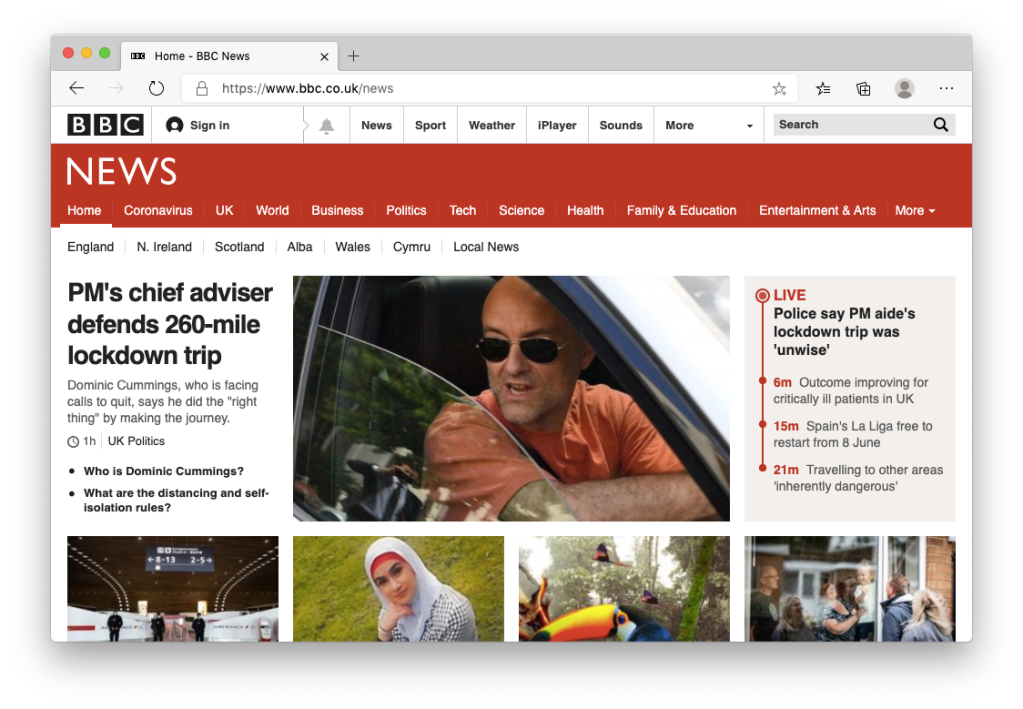
“Microsoft ‘to replace journalists with robots’” from BBC News
Microsoft is to replace dozens of contract journalists on its MSN website and use automated systems to select news stories, US and UK media report.
I’d love to know why somanynewsorganisations are using the term “robots” to describe algorithmic selection of content. Google has been doing this since 2002 with Google News, so I’m surprised that this is even news (though I’m of course sad for those who are now out of a job). I’ve always thought the term “robot” to be a pointless one. We don’t call our washing machines robots, so why would we call any other machine that isn’t anthropomorphised a robot?
I can’t help thinking this is also being used as an excuse to remind people MSN News still exists.
The Apple Watch is great for many things, but listening to music or podcasts is still problematic. Apple haven’t been able to solve what, on the face of it, seems like a simple challenge: synchronising content to the watch.
While you can now stream music and podcasts, theoretically removing the need to synchronise media, in practise many people (such as myself) live in areas where 4G signal is poor, simply don’t want to, or own a watch without a data plan.
The solution Apple seems to have proposed is to simply mark content you want to be stored on the watch, and let them do the rest, at their time of choosing. This leads to random frustrations because inevitably this “smart synchronisation” doesn’t sync the right content at the right time. Sometimes transfers only happen when the watch is plugged in, other times they seemingly get stuck and drain the battery right down. Due to the fact that watchOS is very restricted in what it can do, there is no room for third party applications to try and do better either. The experience of setting off for a run only to find the latest episode of your favourite podcast isn’t available is surely familiar to any Apple Watch owner.
What I’d like to see is a way to from the watch itself, select a song, album or podcast and have it transferred over from my phone there and then. No “pending”, no waiting for a charger to be attached - just do it right now, so I can go for my run, and please Apple - show a progress bar while you’re at it - like iTunes did in 2001. If having a power source is really needed, then tell me to charge the watch there and then, and instead of nightstand mode, show a progress bar while the watch is on the charger. This functionality needs to be made available to third party applications such as Overcast too.
While I’d love for synchronisation to be automatic and happen at night without me knowing, in practise this doesn’t seem to work. I missed many buses as a teenager waiting for my iPod to sync and while I don’t take the bus as much these days, it’s somewhat reassuring to know things haven’t changed that much as I sit and wait for my Apple Watch to sync before I leave the house. The difference is my iPod would generally work first time.
You are most likely to catch the SARS-CoV-2 virus by spending a long time near an infected person in an enclosed space. Researchers in Guangzhou, China, examined how the virus was transmitted between 347 people with confirmed infections and the people they had contact with. They found that the risk of the infection being passed on at home or by repeated contact with the same person was approximately 10 times greater than the risk of passing it on in a hospital and 100 times greater than doing so on public transport (medRxiv, doi.org/dwgj).
Probably the most informative, accessible and actionable article I’ve read about minimising Coronavirus infection.
It’s all very well asking people to use “common sense”, but vast swathes of the population don’t know how viruses spread. Take for example the tradesperson who came to visit my house recently to fix a problem with a door. While he demonstrated plenty of common sense in being able to fix the problem (10 minutes to fix something that I had spent hours trying to fix and couldn’t), he also wore a face-mask so low down on his face that I could see his top lip. One motto I’ve taken with me throughout my life is that there is no such thing as “common sense”.
The rise of Zoom could be the headline for the 2020 technology scene. Zoom has replaced classrooms, board meetings, concerts, and even some low budget sporting events. What I find interesting about Zoom is how it took off for video communications while we had other services that were better in a lot of ways. I particularly want to look at FaceTime during COVID-19, and how despite having a nearly decade long existence and being built into every iOS and macOS device, it didn’t have its ‘Zoom’ moment, and why Zoom became the new default group video service. It doesn’t work on Windows, Android, and the web
There have long been rumours that Apple have FaceTime and iMessage running on Android in a bunker somewhere. The global health crisis and resulting lockdown would have been the perfect opportunity to put customers before the need to lock them into an ecosystem, and release them both for Android. If it’s not already a product that’s ready to go, then I can’t see a good reason not to build it now. I don’t buy an iPhone because it has FaceTime or iMessage, and I’m not sure who would. Messaging and video calling are now commoditised. WhatsApp, Houseparty and of course Zoom are ubiquitous and cross platform. In the end, it’s because of Apple’s stubbornness that their own customers are forced to use less secure, less privacy-aware battery-draining alternatives.
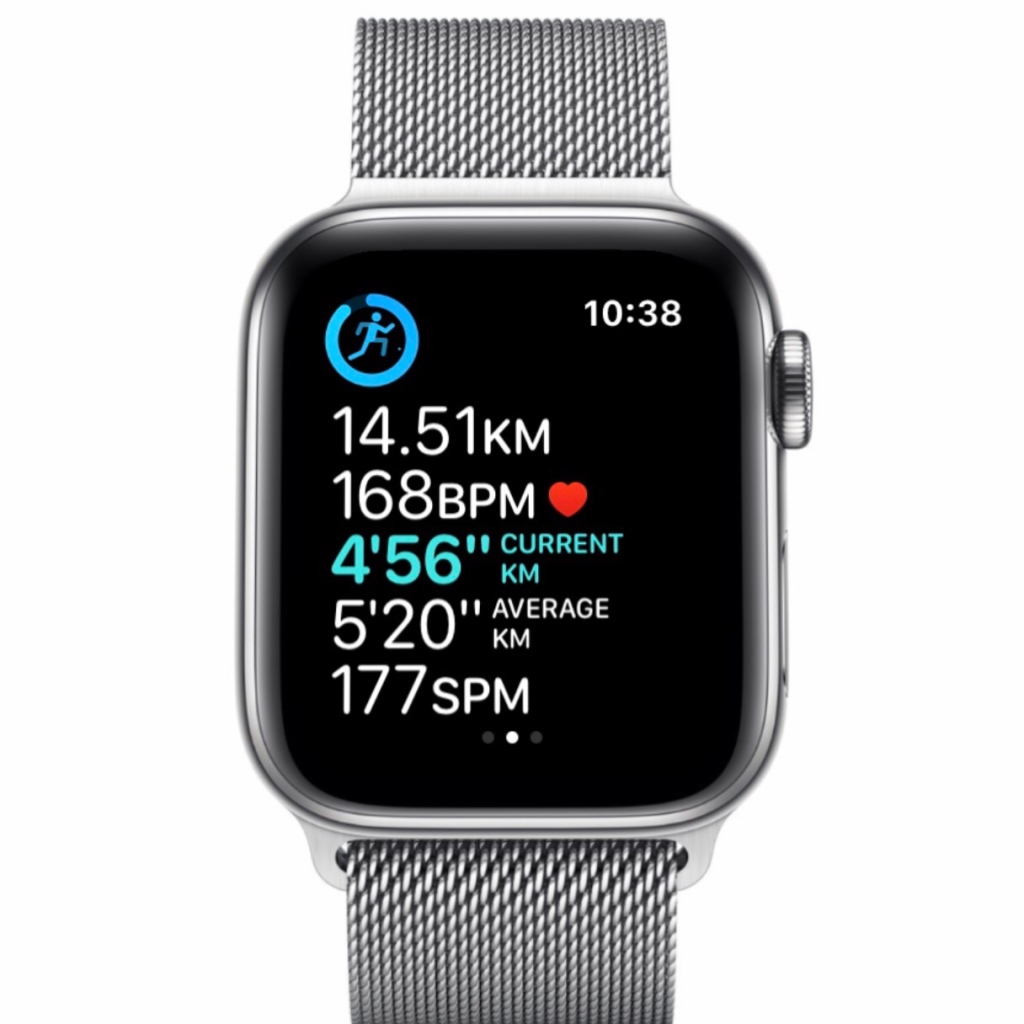
The Apple Watch allows the information displayed while running to be customised. You can either choose to show a single metric at a time and swipe through them app, or you can choose to see multiple metrics, of which you can choose up to 5. You don’t need to fill up all 5 slots however, and choosing fewer pieces of information means the metrics that are shown will be bigger and more legible. After using the Apple Watch for running for 5 years now, I’ve settled on the following metrics.
Distance So Far - While I don’t particularly care about time elapsed, knowing the elapsed distance allows me to know how far there is to go, and therefore how much energy I can afford to expend.
Current Heart Rate - The speed of the heart is a good indicator of how hard you’re working. I generally know if I’m above 185 then I’m putting in a lot of effort. A more relaxed run should be between 140 and 167. However if it’s particularly hot, or I’m coming down with something then my heart rate will be higher even if I’m not running at my usual pace - therefore I’ll want to take it easier than usual to avoid overly fatiguing my body.
Current Pace - I’ve always worked in kilometres when running, possibly because this is how the treadmills worked at the gym I belonged to when I first started out running. Knowing your current speed is of course the best way to make sure you’re on track to finish in the time you planned to.
Average Pace - This among with a bit of mental maths let’s me know my predicted finish time. I know whether I should speed up or hold off the gas slightly. One thing I wish Apple would add is the ability to see your predicted finish time instead, based on your average pace.
Average Cadence (Steps Per Minute) - Knowing my cadence is for me the best indicator of whether I’m running well. When I’m tired I am prone to running with bad technique and this usually coincides with a lower SPM. Making sure I keep above 175 reminds me to avoid stomping and focus on posture and arm movement, crucial factors when trying to avoid injury. I tend to get better times with a higher SPM too.
For a software company, Microsoft has an inconsistent track record when it comes to actually producing decent software. I can only imagine a lot of this may stem from internal politics and design by committee. Their failure to piece together a decent web browser over the last decade was starting to become down right embarrassing for a company which once held 95% of the browser marketshare. Back “in the day’, Internet Explorer was without question the best web browser out there. It wasn’t until Microsoft disbanded the IE team, Firefox came along, and later Google Chrome, that IE started to look like old-hat. The Trident engine was dragged kicking and screaming into the touchscreen age but was never able to keep up, in terms of both features and performance. Even a rebrand from from the 90’s inspired Internet Explorer to the play on words that is “Edge” (Edge was the name of a mode for Internet Explorer that was on the “bleeding edge” and would allowed the latest HTML features to be supported) couldn’t save it.
Now though Edge has been reborn using the same engine as Chrome, Blink. Gone is the legacy of Trident. Now we have what is essentially Google Chrome but without the annoying things Google likes to do. It’s strange, but it’s similar to Netscape and Mozilla. Netscape after being bought by AOL ended up being bloated out as a way to sell other products. Chrome feels this way these days. Privacy enhancing settings are buried deep in the settings so that no casual user would every find them. That and the browser really wants you to sign into your Google account and synchronise everything, even if you really don’t want to. Edge however is a breath for fresh air. On my 7 year old MacBook it flies by, and anecdotally seems faster than Safari. It supports Chrome plugins, and so is actually better than Safari in this respect. Safari took the regressive decision to require plugins install a full Mac application. On my even older Windows laptop, Edge manages to hide the hardware’s age with surprising grace. Microsoft make it easy to turn off 3rd party cookies and offer other privacy enhancing settings. The browser seems to be written for users and not for the benefit of its creator, a sure good sign. If you decide you don’t want to sign in, it’s not overly pushy about reminding you, even though I’m likely to actually trust Microsoft with my bookmarks and browsing history, and so will probably end up creating an account.
It feels odd seeing the word “Favourites” instead of “Bookmarks” in the menu bar. It takes me back to using the web as a teenager in the late 90s and using the last version of Internet Explorer for Mac on Mac OS X version 1 back in 2001.
At work, I’ve switched from Firefox to Edge. At home, I’m seriously considering switching from Safari to Edge. The only thing holding me back is the lack of synchronised reading list between Safari on my iPhone. When Apple eventually allow Edge to become the default browser on iOS too, I’ll give it more serious consideration.
One of things like enjoy about iOS is the attention to detail and inclusion of features that few people would think to ask for, but that vastly improve our quality of life. One such thing is the ability to keep track of audio levels of your headphones over time. If you are using headphones that support this feature (no surprise - Apple and Beats both do) then you’ll see entries in the Health app when you play audio from your iPhone or Apple Watch (phone calls, and sounds played from an iPad or Mac are not included) you’ll see a log of the decibel level and clear advice on whether you’ve been playing your music too loud. I wish this feature had been available on iPods when they first came out. Since I was 23 I’ve had mild tinnitus, likely down to listening to music on the bus every day as I went to and from college. Now I can make sure my dB level never is never too high, and even try to keep it as low as possible (thanks to noise cancelling headphones).
Yet one more feature Apple have added to iOS that would make it difficult to switch to Android.
I’ve just discovered this, hidden away in Settings under “Sounds and Haptics” is a “Volume Limit” feature. I’d missed this. On the iPhone it’s under Music settings, not sound. Still, I’d recommend everyone set this to 60% to avoid hearing loss when streaming music from your Apple Watch. Update: the latest operating systems have moved the setting to a new “Headphone Safety” menu.
I’ve had the AirPods Pro for just over two months now, so I’m posting my thoughts in the hope that someone might find it useful to get a ‘normal’ person’s review. By ‘normal’, I mean someone isn’t a technology reviewer by profession, and so doesn’t receive the latest gadgets on a weekly basis, and as someone who had to shell out their own hard earned money for the privilege! (On a tangent, there are some great YouTube channels out there reviewing gadgets, but as soon as the creator goes ‘pro’ and suddenly has a £2,000 laptop or £1,200 phone every week, they loose part of what made them interesting, in my humblest of opinions).
AirPods Classic
I’ve been using AirPods since 2017 – boy does time fly, it seems like yesterday. I was immediately a fan. The main selling point for me was the fact there was no ‘on/off’ button, and you didn’t need to worry about leaving them switched on. I was forever leaving my other bluetooth headphones powered on and in my bag, and then getting frustrated when Siri didn’t work because it was listening to me through the headset and not my phone’s microphone. AirPods solved this brilliantly. The fact they were such an elegant package, and worked so seamlessly with the Apple Watch was also really cool. I swear running without my brick of an iPhone 8 Plus helps me get a better time. I still use my 2017 ‘original generation’ AirPods regularly, although the battery life is now a little under 2 hours when listening to music, or about 45 minutes if making a call. I can’t help but think the relatively quick degradation of AirPods’ battery compared to say my Plantronics BackBeat FIT (which I’ve had since 2015 and still manage 5 hours) is due to the fact they are constantly charging in the case when not in use. Apple released a feature for the iPhone in iOS 13 that stops your phone from charging all night, in order to lengthen the battery longevity. Using that same logic, being plugged in 90% of the time must take its toll on the AirPods’ battery. Needless to say, the convenience, small size and sheer utility meant I was excited about upgrading the the AirPods Pro.
Fit & Style
The biggest noticeable difference with the AirPods Pro is the shape and size. Gone is the long pole that hangs down form your ears. Objectively, the AirPods Pro probably look better than the classic style of AirPods, however the classic AirPods are so ubiquitous now that what once seemed ridiculous now comes across as quite fashionable. If anything, I can see the classic AirPods (which Apple continues to sell) being more popular with younger, more cash-strapped individuals, and consequently more fashionable. Due to their price, AirPods Pro are more likely to be seen on middle-aged IT workers, which may limit their fashion appeal. Despite that, they fit exceptionally well thanks to the three sizes of ear-tips that come in the box, and a built in software utility that helps you to determine if you have a good fit for noise isolation. They are slightly more fiddly to put away than the originals – I find the ear tips often fold inside-out when I remove them from my ears which can be annoying. On the whole though, a better fit means better sounding music. The classic AirPods had terrible noise isolation, so much so that I couldn’t use them on the train in the summer when the windows were open. As a sufferer of tinnitus since I was 23, I am very conscious of not increasing the sound levels on headphones above the EU recommend limit. With AirPods Pro’s more secure fit, I rarely need the volume above 75%.
Sound Quality
There’s a lot to be said for the line of thinking that goes: the more you pay for a pair of headphones, the better they sound. Just knowing you have a pair of premium, 24-bit, gold plated headphones can cause a placebo effect in of itself. The AirPods Pro however, do genuinely sound amazing. I’ve heard parts of songs I’d not noticed before: previously hidden rhythm guitar sections, or faint backing vocals. This is on songs I’ve been listening to for 20+ years. The AirPods Pro sound great. The biggest new feature, Active Noice Cancelation (ANC) is extremely good too. I’ve only ever had one pair of noise cancelling headphones before, the Plantronics BackBeat Focus – my office daily driver for Skype Calls. I’d say the AirPods Pro’s ANC is much better, especially considering their small size. I don’t travel often, but I did a short flight recently and was able to listen my AirPods Pro at about 40% volume with ANC switched on which was outstanding. When out and about, Transparency mode does an exceptional job at passing through the sounds of the world around – essentially for walking or running on country lanes against the traffic, as I do frequently. It’s an odd sensation, it seems to slightly increase the higher range meaning you notice the birds singing more than usual. After a while it’s easy to forget you are wearing the AirPods as the outside world sounds so natural, except if it’s windy. I’ve found that running or walking in a breeze does lead to an uncomfortable sensation of of what sounds like someone blowing directly into your ears. I’m surprised there was no way with all the technology onboard this sound could be offset, but I imagine that’s not an easy problem to solve. I hope Apple can improve this with a software update. It’s not a deal breaker, but it’s also not something I’ve ever noticed with other headphones before.
Controls
With the classic AirPods, you could double tap either side to invoke Siri, or trigger play/pause – depending on your configuration. With the new AirPods, double tapping is gone. Instead you need to squeeze the tip. This is more flexible as you can now either press once, twice or three times for play pause, skip forward and skip backward respectively. Pressing and holding switches between ANC and Transparency mode. Overall it’s a better system however I’ve noticed that I often pull the AirPod slightly out of my ear when using this control mechanism, which means I inadvertently loose the seal needed for decent noice cancellation. Siri is as inconsistent as ever. Unlike my OG AirPods, there’s no need to double-tap, I can just shout ‘Hey Siri’. Sometime Siri works like magic – ask it to turn on transparency mode, or lower the volume and 70% of the time it responds instantaneously saying ‘Okay, done’. The rest of the time however, it either takes too long that you doubt yourself – did I say the right thing? – and end up getting your phone out of your pocket, or it gets the wrong idea completely. There is something infuriating about requesting your favourite song, and having your phone proudly inform you it’s going to play a totally different song, from a genre you can’t stand, at maximum volume. Once thing I do notice is you need to say “Hey Siri’ pretty loud. Probably no louder than normal conversation, but louder than I’d like to when I’m in a public place. There’s something about asking your phone to remind you about buying toilet paper, or to send a text your significant other with a question asking them what they want for dinner that means I don’t want to scream it like Dom Joly.
A feature I have enjoyed is one hidden away under the notification settings for iMessage that allows messages to be announced and read by Siri when they arrive. This is genuinely cool, but I’m flummoxed as to why it’s only available on AirPods. Yes you can reply instantly without needed to say ‘Hey Siri’ which requires some clever work by Apple, but I’d be willing to forgo this if I could have this feature in my car too. It’s also of limited use because it doesn’t work with WhatsApp, which is the de facto SMS replacement in the UK.
Overall
I’m very impressed and would recommend them to anyone in the market for some premium headphones. Then again, for a staggering £250, I expect to be impressed. I understand there’s a lot of new technology in these, but I feel £199 would have been more reasonable for something with a 3-year lifespan. The main downside of the AirPods is their limited lifespan. For 2-3 year however, expect to enjoy great sounding music.
If you’re lucky enough to own a smartphone these days, as most people do, then you can most likely use it to replace your wallet. With Apple Pay and Google Pay, you can spend money without the need for cash for bank cards. Store Cards such as Tesco Clubcard can also be placed in your digital wallet. I even store my library card on my phone thanks to this app which lets you digitise any barcode based pass and place it in your Apple Wallet. I’m so used to this situation now, that I rarely go out with a wallet on my person. Once train ticket machines started taking contactless there really was no need. One less thing to lose, one less thing to remember. However I ran into a slight hitch the other day when I ordered something online from for pickup in an Apple Store. I placed the order while walking through the shopping centre, knowing the item was in stock and would be ready for me to pick up within 30 minutes. I paid using Apple Pay on my phone, and an order ticket was placed into my digital wallet. About 10 minutes later a notification appeared on my phone saying it was ready for pickup. Excited, I took the escalator to the upper floor of the shopping mall and walked into the Apple Store, phone in hand, QR code ready on the screen. All went well until the Apple Store employee asked to see some identification. I had none. Why Would I? I use a digital wallet. In many respects, I am the prototypical Apple Customer, using minimal time from staff and making my purchase online using Apple Pay, from an iPhone. Yet they wouldn’t give me my new AirPods without seeing some form of identification. While I understand that you can’t just handover expensive items without some kind of validation in place, I was surprised that Apple, of all companies, did not have a digital alternative in place. You could argue it’s not the role of Big Tech to be creating digital ID cards, and perhaps there are benefits to plastic-based identification. In the UK, thankfully there are no laws requiring citizens to carry identification (even when driving). That said, I’d love to see a solution that works in tandem with our existing systems and doesn’t exclude anyone who doesn’t own a smartphone, or wants to keep using plastic ID.


 I’ve just discovered this, hidden away in Settings under “Sounds and Haptics” is a “Volume Limit” feature. I’d missed this. On the iPhone it’s under Music settings, not sound. Still, I’d recommend everyone set this to 60% to avoid hearing loss when streaming music from your Apple Watch. Update: the latest operating systems have moved the setting to a new “